
 AI
AI What Is AI Implementation for Businesses in Uzbekistan?
AI implementation is not adding a chatbot. It is embedding intelligent agents into real business workflows - lead qualif...
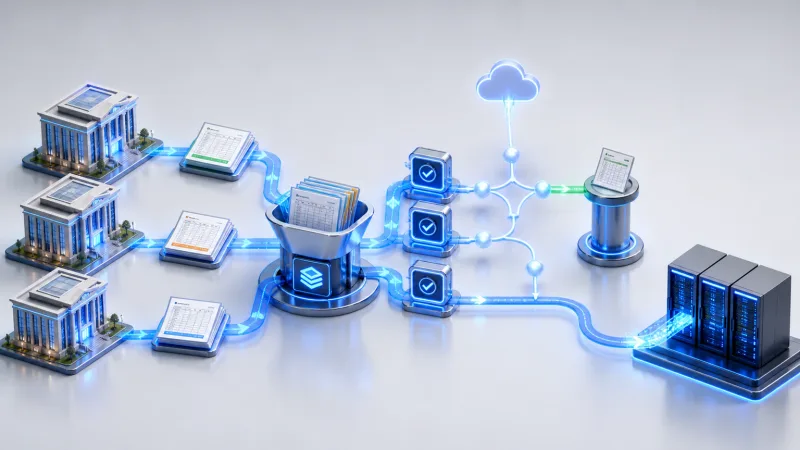
There are two days left before month-end close. The head office in Tashkent is waiting for a trial balance statement from the Samarkand branch. The columns in the Excel file from Fergana have shifted. The file sent by Nukus, meanwhile, is still waiting for the director’s signature. The finance specialist sends another Telegram message: "When will the report be ready?"
Another reminder or an additional supervisor will not fix this process. As soon as a branch prepares a file, the system should validate it, route it for approval, and transfer it to the ERP. Every branch should submit data through the same form or integration. The system checks the period, accounts, and amounts, notifies the responsible employees through Telegram, and enters approved records into 1C or SAP. Employees step in only when an error or unusual case appears.
This does not require replacing local accounting software all at once. Start with the single report that is delayed most often, define the rules clearly, and reduce manual handoffs. We do not begin projects like this with a polished management dashboard. First, we fix where the file gets stuck—and why.
A branch closes its local accounts, emails an Excel file, and scans the signed copy. The head office then re-enters the finalized figures into the ERP. If an error is found, the file goes back to the branch. A single incorrect account code can push the entire chain back by a day.
The pressure increases during the annual close. According to Commenda, the filing deadline for companies operating on a calendar year is April 1. But having three months does not mean the work can be postponed until March. The head office needs to see not only who has failed to submit a report, but also the exact validation step where each file has stopped.
Delays usually accumulate at three simple handoff points.
01
Each branch organizes columns and account names in its own way.
02
The head office cannot see where a file awaiting signature is currently stuck.
03
Figures prepared by the branch are manually entered into the ERP all over again.
The branch uploads its report to a portal, or its local software sends it through an API. The system immediately checks the branch code, reporting period, account mappings, and control totals. If it finds an error, it does not simply respond with "invalid file." Instead, it identifies the problem itself—for example: "The difference between debit and credit for account 6010 is 2 430 000 soums."
A report that passes validation is sent to an authorized manager for approval. The approval record is saved, and only then does the data move into the ERP. Do not turn Telegram into a file repository. It can contain reminders, status updates, and a link to the approval page. The original financial file, however, should remain in a secure system.

Manual corrections and approval queues create delays long before month-end.
Before launching a large project, test one report across two or three branches.
The most common mistake in financial automation is placing artificial intelligence on top of a disorganized process from day one. Checks such as account codes, reporting periods, and total amounts should be handled by strict rules. These rules are easy to test and easy to explain during an audit.
Artificial intelligence can extract fields from scanned documents, flag unusual discrepancies, or summarize a long explanation written by a branch. Comments in Uzbek, Russian, and English can all be processed within the same workflow. The language is chosen according to the employee and document context. But an uncertain response from a model should never become an ERP record without validation.
A Hard Rule Artificial intelligence provides recommendations. Financial records, however, are created only by approved business rules. A project that crosses this boundary may work quickly in a demonstration, but it cannot be trusted in practice.

A single entry point standardizes data and immediately starts checks and approval.
For many companies, replacing the ERP does not solve the problem; it only makes the project more expensive. If 1C or SAP has an import mechanism, the automation layer converts approved data into the required format. If an API is available, the system also receives a response: whether the record was created, rejected, or sent for review.
If integration options are limited in a legacy system, scheduled file exchange can be used. Leave a robot that replicates on-screen actions as the last resort. Even a minor interface change can stop it from working. For every record, the audit log should preserve who submitted it, who approved it, and what response the ERP returned.
The first KPI is the share of branches that submit complete and accurate reports by the deadline. The second is the average time needed to correct an error detected by the system. Together, these two indicators show exactly where the process is breaking down.
For example, if reports arrive on time but the head office spends three days rechecking them, the project is not finished. If automated validation sends an error back to the branch as soon as the file is uploaded, the central finance team can analyze the data instead of sending reminders. The value of automation is not measured by reducing headcount. Being able to predict the closing date is a far more useful outcome.

Automation can connect to the existing ERP without replacing the core system.
Do not compromise on these principles when organizing branch reporting.
Which financial report should be automated first?
Choose the report that is delayed most often, frequently requires rework, and has clear validation rules. This is often a trial balance statement, expense register, or payroll summary. If you choose a tax process with many exceptions for the first stage, the project timeline will become unnecessarily long.
Can the process be automated even if 1C or SAP does not have an API?
Yes. Approved data can be converted into Excel, CSV, or another import format accepted by the ERP. If no import option is available, a robot can perform the on-screen actions. Such robots are sensitive to interface changes, so they need monitoring, error notifications, and a restart mechanism.
Can branches submit reports through Telegram?
Telegram is useful for reminders and status messages, but do not turn it into the sole storage location for financial files. A bot can direct employees to a secure upload page, remind them of deadlines, and display validation results. The file, approval history, and audit records should be stored in a system controlled by the company.
What happens if artificial intelligence identifies a financial figure incorrectly?
Every field extracted by the model is checked against formatting requirements, control totals, and business rules. If the confidence level is low or the amounts do not match, the document is sent to an employee. It is not written to the ERP automatically. Especially when working with scans and photographs, defining in advance when human approval is required reduces financial risk.
The Celion team analyzes how branch reports arrive, where they get stuck, and who re-enters them. We then build an automation solution that works with 1C, SAP, or your existing internal system. Contact us to select the single process with the most frequent delays and begin with a practical pilot.
Callback
Leave your details and we will contact you shortly.
Become a Partner
Leave your contact details and we will get back to you shortly.
Order Service
Leave your phone number and we will contact you shortly.